Documentation · Start here
Use OH with coding agents
A coding agent can list, inspect and steer sessions started in OH, including sessions on a paired supervisor. Link the bundled oh-router CLI to give your agent the same session controls as the app.
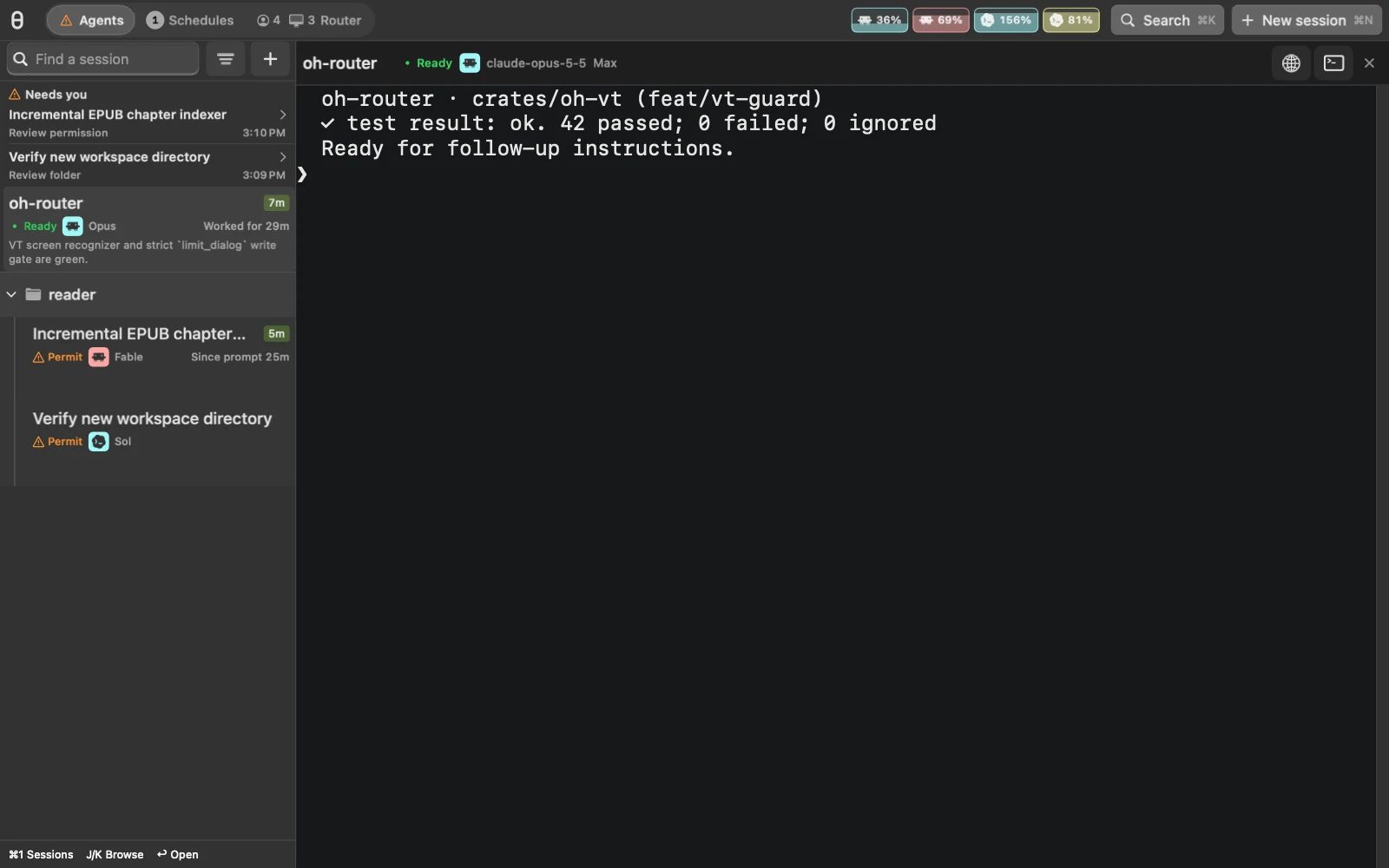
Find the session that needs you
Open Agents (⌘1). Sessions that need your input appear at the top. Select a session to read its conversation. For a paired Mac, check the device’s access in Router before sending a message.
Install OH and link oh-router
OH requires an Apple Silicon Mac (arm64) running macOS 15.0 or newer. Install Oh.app from oh.computer or Homebrew, then open Help → Use with Coding Agents… in the menu bar.
The OH cask installs the app. If you use the standalone OH Router formula as well, its command stays in Homebrew’s bin directory. If an older OH cask linked the bundled command there, run brew reinstall --cask hraness/tap/oh before installing the formula.
- Click Install
oh-routerCommand (~/.local/bin/oh-router) inside Help → Use with Coding Agents… to symlink~/.local/bin/oh-routertoOh.app/Contents/Helpers/oh-router. OH links onlyoh-routerand never overwrites any other command in~/.local/bin. - Click Install Skill to
~/.agents/skills/oh/(or runnpx skills add hraness/product-skills --skill oh) so local coding agents loadSKILL.md. - To collect Claude Code turns and identify its transcript, configure hooks in the same personal or work folder used by that profile. Replace
/path/from/personal_dirin the example with the folder from Router. Run the setup command without--writefirst to see the settings.
$ brew install --cask hraness/tap/oh
$ npx skills add hraness/product-skills --skill oh
$ oh-router --version
$ oh-router daemon setup-hooks --claude-dir "/path/from/personal_dir" --write
Inspect a session and queue a prompt
Run oh-router ps --json to find the session ID. Inspect that ID to read the latest turns and terminal state. The supervisor distinguishes an empty prompt from a folder-trust, permission or usage-limit dialog. Use the ID returned on your machine in the following commands.
$ oh-router ps --json
$ oh-router inspect term_01 --json
$ oh-router steer term_01 --mode queue "Run cargo test --workspace next"
When OH recognizes a usage-limit dialog, it holds queued prompts and blocks raw terminal input.
Continue a Claude session in Codex
You can switch a supervised session as soon as you know the Claude account is out of usage. Find the session in Agents or with oh-router ps --json. Use its ID with the Sol or Astra tier and a signed-in Codex profile.
OH carries over recent turns, terminal context and queued prompts. When Claude hooks identified the original transcript, the handoff also includes its path. OH checks the replacement before stopping the original. If the command reports a pending switch, inspect the replacement and retry with the original ID.
$ oh-router ps --json
$ oh-router switch term_01 --tier sol --json
Session environment variables
Every process spawned by ohd receives these environment variables automatically:
| Variable | Purpose |
|---|---|
OH_SESSION_ID | Unique session identifier (term_...) for the current PTY holder. |
OH_PROJECT | Project name passed to oh-router spawn --project. |
OH_PROFILE_ID | Workspace profile (default, work, etc.) selected for this session. |
OH_CONTROL_SOCKET | Private Unix domain socket (~/.local/state/oh/ohd/ohd.sock, mode 0600). |
OH_EVENT_SOCKET | Hook event socket (~/.local/state/oh/ohd/events.sock, mode 0600). |