Documentation · Multi-machine
Cloudflare Tunnels & Pairing
Pair a Linux machine, Windows WSL2 distribution or secondary Mac with your primary workstation over HTTPS using cloudflared, a 127.0.0.1 HTTP JSON-RPC bridge, and least-privilege stream_steer Bearer tokens.
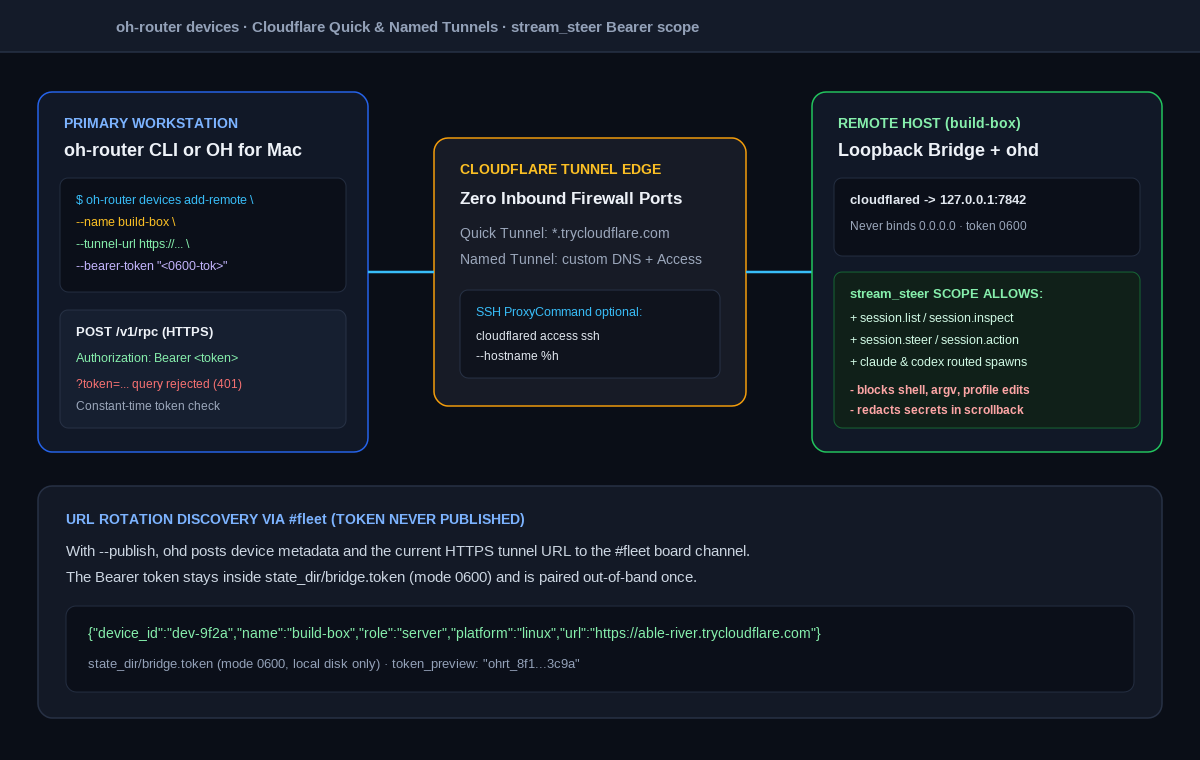
oh-router devices tunnel-start pairs cloudflared with a 127.0.0.1 HTTP JSON-RPC bridge using constant-time stream_steer Bearer tokens.Run a device on Linux, Windows or macOS
On Windows, run wsl --install -d Ubuntu in PowerShell, then open Ubuntu. Inside that distribution, install the Linux builds of OH Router, cloudflared and your agent, and sign in to Claude Code or Codex. Use Linux paths for projects, including /mnt/c for files on the Windows C drive.
With Router 0.1.5 or later, run oh-router daemon install as the account that runs the agent. This starts a user service on Linux and WSL2 with systemd, or a LaunchAgent on macOS. For a persistent named tunnel, install with oh-router daemon install --listen and configure cloudflared to run as a service pointing to http://127.0.0.1:7842. Run oh-router daemon status to check it. For a Linux server used after logout, enable user lingering.
The service returns after a crash, a kill or an out-of-memory stop, and your sessions keep running while it restarts. Each failure is recorded in failures.log in the state directory. With Router 0.1.7 or later, run oh-router daemon install again to bring an earlier installation up to date. A definition you wrote yourself is kept unless you pass --replace, and a running Router is left alone: the new definition applies when the service next starts on Linux, and at the next sign-in on macOS.
oh-router devices list also returns each device’s free disk space, available memory, processor use and network traffic under vitals, with the round trip time to each paired device. The Router reads these from the operating system and contacts no other host for them.
Keep WSL running while using the device. For unattended use, run wsl.exe -d Ubuntu --exec sleep infinity at Windows sign-in. Microsoft’s systemd setup explains how to enable systemd in an existing distro.
After pairing, use oh-router devices list on your workstation to find its ID. Launch a session with oh-router codex --device rem-build-box --cwd /srv/project. The working folder and signed-in agent belong to the destination.
One-click agent pairing recipe
Copy the self-contained setup prompt below and paste it into a coding agent running on your remote Linux or macOS machine, or generate a customized Markdown recipe locally with oh-router devices recipe --name build-box --quick.
Remote Host Setup Prompt
Instructs an agent on a remote host to install oh-router, start ohd, open a stream_steer Quick Tunnel, and report the HTTPS URL and 0600 token path.
Quick Tunnels and Named Tunnels
devices tunnel-start binds the HTTP JSON-RPC bridge strictly to 127.0.0.1 (default port 7842), writes or rotates the secret token in <state-dir>/bridge.token (mode 0600), and spawns cloudflared pointing at that loopback port.
Ephemeral Quick Tunnel (*.trycloudflare.com, no Cloudflare account or DNS record required):
$ oh-router daemon start
$ oh-router devices tunnel-start --scope stream_steer --quick --publish
Persistent Named Tunnel with your own DNS hostname:
$ oh-router devices tunnel-start --scope stream_steer --tunnel build-box --hostname ohd.example.com --publishRegister the remote host on your primary workstation:
$ oh-router devices add-remote --name build-box --role server --platform linux --tunnel-url https://ohd.example.com --bearer-token "<PASTE_STREAM_STEER_TOKEN>"
$ oh-router devices list --json
Token scopes and transport rules
- Loopback binding only:
/v1/rpcbinds exclusively to127.0.0.1and never listens on0.0.0.0. - Header-only Bearer auth:
Authorization: Bearer <token>is verified in constant time (subtle::ConstantTimeEq). Any request carrying?token=or percent-encoded query credentials is rejected with401 Unauthorized. - Least-privilege
stream_steerdefault: allowsstate.snapshot,session.list,session.inspect,session.steer,session.action,queue.*, andclaude/codexspawns while rejectingkind: "shell", customargv, profile edits, and tunnel changes (403 Forbidden). - Token-free
#fleetannouncements: passing--publishposts{device_id, name, role, platform, url}to the#fleetboard channel so workstations follow rotated Quick Tunnel URLs without ever transmitting the Bearer secret.
Optional SSH ProxyCommand helper
When a remote machine also runs an SSH Access hostname behind cloudflared, devices ssh-config previews or writes a managed # oh-cloudflare-ssh:start block in ~/.ssh/config after validating host, DNS, and username characters.
$ oh-router devices ssh-config --host build-box --hostname ssh.example.com --user dev
$ oh-router devices ssh-config --host build-box --hostname ssh.example.com --user dev --write