04 / Reach
Reach
Install the Router on the other machine, give it a way in, and register it here. Its sessions then show up in oh-router ps and take --device.
Set up the other machine
Install the Router, the agent CLI and cloudflared as the account that runs the agents, and sign in there. Then run oh-router daemon install --listen, which keeps ohd running as a service with the bridge on 127.0.0.1:7842 (see Run). For a Linux server used after logout, enable user lingering.
On Windows, use WSL2: run wsl --install -d Ubuntu, install the Linux builds inside Ubuntu, and keep WSL running with wsl.exe -d Ubuntu --exec sleep infinity at sign-in. Microsoft’s systemd guide covers enabling systemd.
Or let an agent do it
Paste this into a coding agent on the other machine. oh-router devices recipe --name build-box --quick writes a version for your setup.
Remote setup prompt
Installs oh-router, opens a stream_steer quick tunnel and reports the address and token file.
Open a tunnel
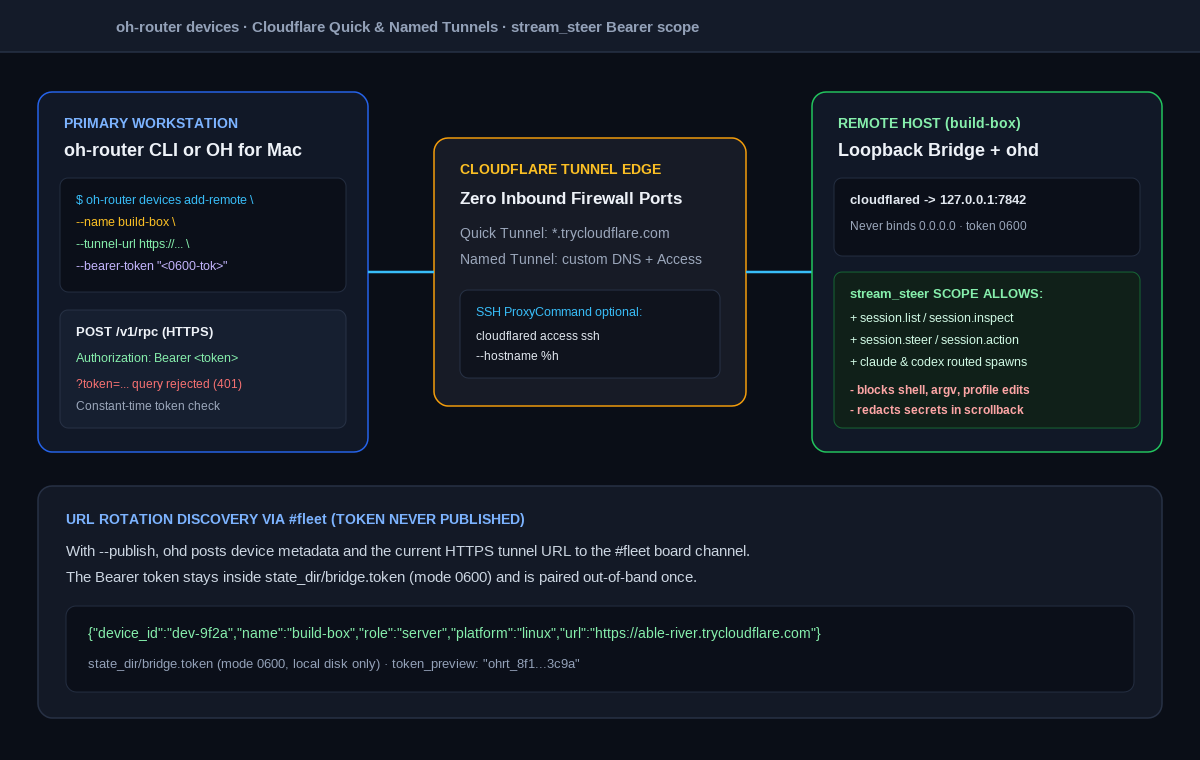
devices tunnel-start binds the bridge to 127.0.0.1 only, writes its token to bridge.token (mode 0600) and starts cloudflared in front of it. A quick tunnel gets a temporary trycloudflare.com address and needs no Cloudflare account. A named tunnel keeps your own hostname.
$ oh-router devices tunnel-start --scope stream_steer --quickOr a named tunnel:
$ oh-router devices tunnel-start --scope stream_steer --tunnel build-box --hostname ohd.example.comThen register it on your workstation:
$ oh-router devices add-remote --name build-box --role server --platform linux --tunnel-url https://ohd.example.com --bearer-token "<STREAM_STEER_TOKEN>"
$ oh-router devices list
$ oh-router codex --device rem-build-box --cwd /srv/app "Run the integration tests"
The folder and the signed-in agent belong to the other machine. --rotate-token issues a new token; tunnel-stop closes the tunnel.
Pair over iroh
Two Routers can also reach each other over iroh: directly when the networks allow it, through a relay when they do not. No Cloudflare account, no open port. iroh is off by default; turn it on on both machines.
A pairing code carries the token, the web address if a tunnel runs, and the iroh address. Treat it like the token and paste it on stdin with --code -. With both routes, the Router tries iroh first and falls back to the web address only when iroh could not deliver, so nothing is sent twice.
The public relays n0 runs at no charge carried well under 1 Mbit/s in our tests: fine for requests, slow for large polls. --relay https://relay.example.com uses yours; --public-relay goes back.
$ oh-router devices iroh on
$ oh-router devices pair-code$ oh-router devices iroh on
$ oh-router devices add-remote --name build-box --code -What a paired machine can do
- The token goes in an
Authorization: Bearerheader only. A token in the query string gets401. stream_steer, the default scope, can list, read and steer sessions, answer dialogs and start Claude Code or Codex. It cannot open a shell, pass custom arguments, read history, change profiles, policy or tunnels, or pair devices.admincan do everything the local socket can. Give it only to machines you would hand a shell.- iroh checks the same token and scope as the web address.
Sign in on the other machine from here
oh-router profiles login --device ID --provider claude --id work runs the sign-in on the device and sends only the sign-in address, or the Codex code, back to your browser. --all signs in every profile of that provider; --status and --cancel read or end an attempt.
Devices
oh-router devices list shows each paired device. short-name ID AB12 gives it a four-character name; toggle-stream ID false hides its sessions without stopping them. The list adds vitals (free disk, memory, processor, network and round trip, read locally) and links, how the last reply travelled: iroh with a direct or relayed path, or web_address.
SSH through the same tunnel
If the machine also exposes SSH through cloudflared, devices ssh-config previews a managed ~/.ssh/config block; --write writes it.
$ oh-router devices ssh-config --host build-box --hostname ssh.example.com --user dev --write